8 Best Photoshop Mockups for Etsy Sellers

On Etsy, the first photo decides the click. Buyers scroll fast and compare dozens of similar listings, so a clean, realistic product image is often the difference between a sale and a skipped listing. Photoshop mockups let you create those photos without printing samples or booking a photo shoot: place your design in a smart object, save, and the scene is ready.
What makes a good Etsy mockup
- Realism: folds, stitching, shadows and lighting that follow the design.
- Variety: several angles and colors so your listing gallery tells a story.
- Consistency: the same style across your shop makes it look professional and builds trust.
- High resolution: Etsy lets buyers zoom in, so export at full size.
8 mockup sets that work great for Etsy
1. Embroidery Cap Mockup Bundle

Custom caps are a popular merch item. Stitched logos look far more convincing than a flat print, and 211 scenes cover every color and angle. See the Embroidery Cap Mockup Bundle.
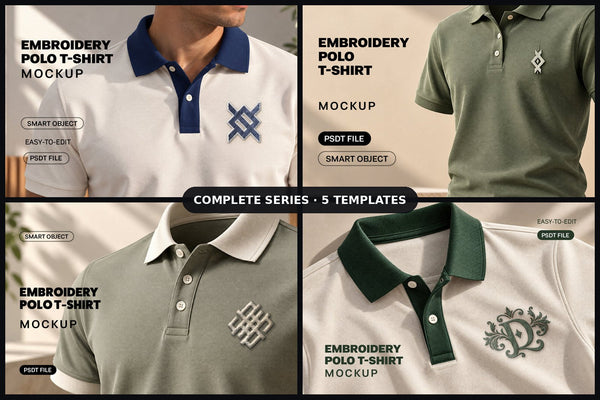
2. Embroidery Polo T-Shirt Mockup Bundle

Ideal for small-business uniforms, sports clubs and corporate merch. Show the logo stitched on the chest before the buyer orders. See the Embroidery Polo T-Shirt Mockup Bundle.
3. Enamel Pin Mockup Bundle

Pins sell on detail. These scenes add metal edges and glossy enamel so your artwork reads as a real product. See the Enamel Pin Mockup Bundle.
4. Pin Button Badge Mockup Bundle

Perfect for fandom art, campaigns and event merch. 79 setups let you build a full listing gallery from one design. See the Pin Button Badge Mockup Bundle.
5. Sticker Effect Mockup Bundle

Stickers are an easy, low-cost product to sell. Add a white border, shadow and peel effect in one click. See the Sticker Effect Mockup Bundle.
6. Wall Poster Mockup Series

For printable wall art sellers: show the print framed on a wall so buyers can picture it in their own home. See the Wall Poster Mockup Series.
7. Laptop Home Office Mockup Series

Selling digital planners, Canva templates or website themes? Put them on a laptop screen in a cozy desk scene. See the Laptop Home Office Mockup Series.
8. Instagram Post Mockup Bundle

Great for social media template shops: show your designs inside a real Instagram feed. See the Instagram Post Mockup Bundle.
Tips for better listing photos
- Use the same mockup scene as the first image across a product line, then add close-ups and lifestyle shots.
- Show every color option you sell; a color layer in the mockup makes this quick.
- Add one image with your design on a plain background so buyers can see the artwork clearly.
- New to PSDT files? Read how to open a PSDT file and how to make a t-shirt mockup in 1 minute.
Browse the full range of Photoshop mockups, or go straight to apparel mockups, packaging and signage mockups and social media mockups. Every file includes a commercial license, so you can use the images in your shop listings.
Find the right template in secondsEditable Photoshop, Illustrator and Canva templates with commercial license.
Browse templates